

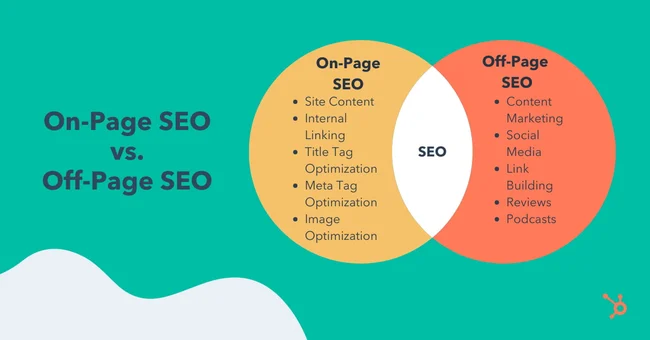
If you’re new to SEO, you might have heard of “on-page SEO” and “off-page SEO.” These terms can sound complicated, but they’re really just ways to help your website show up higher in search results. In this guide, we’ll explain both parts in plain language and give you steps you can follow right away. By the end, you’ll know how to make your site easy for Google to find and how to earn more trust from other sites and visitors.
Easy Guide to On-Page and Off-Page SEO
What Is SEO?
SEO stands for search engine optimization. It means making changes to your website so search engines like Google can find it, understand it, and show it to people who are searching for related topics. Good SEO brings more visitors without you having to pay for ads. It’s like getting free tickets to the biggest show in town.
SEO has two big pieces:
- On-Page SEO: Things you do on your pages.
- Off-Page SEO: Things you do outside your site to build its reputation.
Both parts work together. On-page SEO makes your site strong and clear. Off-page SEO tells the world your site is worth checking out.
Why On-Page and Off-Page Both Matter
Think of your website as a new store in town. On-page SEO is like arranging the shelves and putting clear signs on the doors so people can find what they need. Off-page SEO is like customers telling their friends how great your store is and linking to it on social media. If your store is easy to walk into and other people talk about it, more shoppers will come—and they’ll stay longer.
On-Page SEO Made Simple
On-page SEO covers everything you can change on your site. Here are the most important parts to focus on:
1. Find and Use the Right Words (Keywords)
People type words into Google when they look for something. Those words are called keywords.
- Make a list of words and phrases people in your niche use.
- Use free tools like Google Keyword Planner or simple sites like AnswerThePublic to see what’s popular.
- Put your main keyword in the page title, in at least one heading, and a few times in the text—but don’t force it. It should read naturally.
- Add related words too, so Google sees your page is about that topic.
2. Write Helpful, Easy-to-Read Content
Search engines want pages that answer people’s questions. Write for real people first.
- Give clear answers to real problems.
- Break text into short paragraphs.
- Use headings, bullet points, and images to make your writing easy to scan.
- Aim for at least 800 to 1,000 words on important topics. Longer articles often do better because they cover more ground.
3. Make Your Titles and Descriptions Shine
When your page shows up in search results, people see the title and a short description under it. Think of these as your page’s “shop window.”
- Titles should be under 60 characters and include your main keyword.
- Meta descriptions should be under 160 characters and give a quick, friendly summary.
- Both should sound interesting so that people will click.
4. Speed and Mobile Friendliness
A slow website or one that looks bad on phones will lose visitors fast.
- Use free tools like PageSpeed Insights to see how fast your site loads and get tips to speed it up.
- Choose a design that looks good on phones and tablets. Most website builders let you preview mobile views.
5. Clean URLs and Internal Links
Your web addresses (URLs) should be simple and clear.
- Keep URLs short and include one or two words that describe the page.
- Link to other pages on your site where it makes sense. This helps visitors find more info and tells search engines your pages are related.
6. Add Descriptions to Images
Search engines can’t “see” images like we do. They read the text you add.
- Give each image a short “alt text” description that says what’s in the picture.
- Include your keyword if it fits naturally.
Easy Off-Page SEO Steps
Off-page SEO means earning trust and links from other sites. Here are safe, solid ways to do that:
1. Get Good Backlinks
Backlinks are links from another site to yours. They’re like votes of confidence.
- Write helpful guest posts for other blogs in your field, then include a link back to your site.
- Create useful resources, like guides or checklists, that people want to share.
- Ask friends or partners if they will link to your best articles.
Remember: one link from a respected site is worth more than ten links from little-known pages.
2. Use Social Media to Share Your Work
Social sites don’t count as backlinks in Google’s eyes, but they help people find and link to your pages.
- Post your new articles on Facebook, Twitter, LinkedIn, or Instagram.
- Join relevant groups or communities, share your tips, and link back to your site when it helps.
- Answer questions on forums like Reddit or Quora, and include your link if it truly solves someone’s problem.
3. Collaborate with Influencers
An influencer has an audience that trusts what they say.
- Find influencers in your niche—people who blog, make videos, or post on social media.
- Reach out with a friendly message, offer to do an interview, or propose a joint project.
- When they share or link to your site, you get new visitors and a strong backlink.
4. Ask for Honest Reviews
If you sell products or services, ask customers to leave reviews on your site or trusted review sites.
- Send a follow-up email after a sale, asking for a quick review.
- Offer a small discount or bonus as thanks.
- Good reviews build trust and often include a link back to your site.
Technical SEO Basics
Technical SEO means making sure search engines can crawl and read your site without trouble. You don’t need to be an expert—just cover these basics:
1. Create and Submit a Sitemap
A sitemap is a simple list of all your pages.
- Most website builders make a sitemap automatically (usually at yourdomain.com/sitemap.xml).
- Log in to Google Search Console and submit that link so Google knows where to look.
2. Use Robots.txt Carefully
This file tells search engines which pages not to scan.
- Only block pages that are private or not useful in search (like admin pages).
- Don’t block your main pages by mistake.
3. Fix Broken Links and Errors
Search engines don’t like 404 pages (page not found) on important links.
- Use Google Search Console or tools like BrokenLinkCheck to find errors.
- Either update those links or set up a redirect to a working page.
4. Secure Your Site (HTTPS)
Sites with HTTPS show a little padlock in the browser bar and feel safer.
- Many hosting services offer free SSL certificates that you can turn on with one click.
- Secure sites get a small ranking boost and protect your visitors’ data.
5. Add Structured Data (Optional)
Structured data adds a little code to tell search engines details like star ratings, cooking times, or event dates.
- Tools like Google’s Structured Data Markup Helper make it easy.
- This can make your listing stand out with rich snippets in results.
Tracking Your SEO Progress
You can’t know if your work pays off unless you measure it. Here are free or low-cost tools you can use:
- Google Analytics: Shows how many visitors you get, which pages they view, and how long they stay.
- Google Search Console: Tells you which search terms bring people to your site, any crawl errors, and your click-through rate.
- Simple Spreadsheets: Keep track of how many new backlinks you earn, which pages rank for key terms, and how fast your pages load.
Check your numbers every month. If you see more visitors and better rankings, you know your efforts work. If something drops, you can spot the issue and fix it quickly.
Staying Ahead of Changes
Search engines update their rules all the time. To stay up to date:
- Follow easy-to-read blogs like Beginner’s Guide or the Google Search Central Blog.
- Watch short tutorials on YouTube that explain new features or tips.
- Test small changes on your site and see what works for your audience.
The more you learn, the faster you can adapt when Google rolls out a new update.
Your Next Steps
- Pick one on-page tip and one off-page tip from above.
- Spend one afternoon putting them into practice—update a page and reach out for a link.
- Track your results next month in Analytics and Search Console.
- Rinse and repeat: keep adding fresh content, fixing errors, and making connections.
SEO is a marathon, not a sprint. Little steps each week add up to big improvements in your traffic and rankings over time.
Final Thoughts
On-page SEO and off-page SEO go hand in hand. On-page makes your site clear and helpful. Off-page makes your site trusted and popular. Cover the basics, keep learning, and stay patient. Soon you’ll see more visitors, more links, and higher positions in search results. Now it’s your turn—start applying these simple steps today and watch your site grow!
