

Core Web Vitals basics
Learn Core Web Vitals basics to understand how Google measures your site’s speed, responsiveness, and visual stability. Use these easy website performance tips to make your pages load faster and work better for users.
Core Web Vitals Explained in Simple Words
Google’s Core Web Vitals have transformed how websites are evaluated and ranked in search results. These essential metrics directly impact your site’s search engine optimization performance and user experience quality. Understanding and optimizing these three critical measurements can significantly enhance your website’s visibility, user satisfaction, and conversion rates.
Core Web Vitals represent Google’s effort to quantify real-world user experience through specific, measurable criteria. These metrics focus on loading performance, interactivity, and visual stability—three fundamental aspects that determine whether visitors stay on your site or abandon it within seconds. For business owners, developers, and digital marketers, mastering these concepts is no longer optional; it’s essential for maintaining competitive advantage in search rankings.
The three Core Web Vitals metrics work together to provide a comprehensive assessment of your website’s user experience. Each metric addresses a distinct aspect of performance that directly correlates with user behavior and satisfaction levels. When optimized effectively, these measurements can dramatically improve your site’s search engine rankings while reducing bounce rates and increasing user engagement.
Understanding Largest Contentful Paint (LCP)
Largest Contentful Paint measures how quickly the main content of your webpage becomes visible to users. This metric tracks explicitly the loading time of the most significant content element within the viewport, which could be an image, video, or text block. LCP provides valuable insights into perceived loading speed from the user’s perspective.
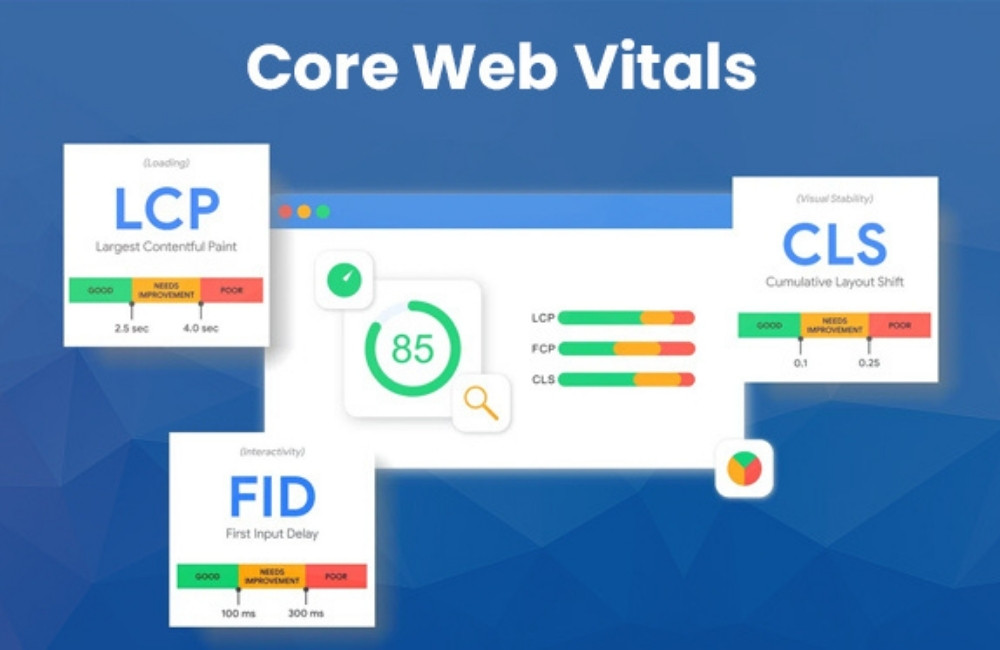
Google considers an LCP score of 2.5 seconds or less as good performance, while scores between 2.5 and 4 seconds need improvement. Any score exceeding 4 seconds indicates poor performance that likely frustrates users and negatively impacts search rankings. This metric directly correlates with user satisfaction, as visitors typically expect immediate access to primary content.
Optimizing LCP Performance
Several strategic approaches can significantly improve your LCP scores. Image optimization represents one of the most impactful improvements, requiring proper compression, modern formats like WebP, and appropriate sizing for different devices. Implementing lazy loading for images below the fold prevents unnecessary resource consumption during initial page loads.
Server response times play a crucial role in LCP performance. Upgrading hosting infrastructure, implementing content delivery networks (CDNs), and optimizing database queries can dramatically reduce server response delays. Additionally, removing unnecessary third-party scripts and plugins eliminates resource competition during critical loading phases.
Critical resource prioritization ensures essential content loads before secondary elements. This involves optimizing the critical rendering path, preloading essential assets, and deferring non-essential JavaScript execution until after primary content appears.
Mastering First Input Delay (FID)
First Input Delay measures the responsiveness of your website when users attempt their first interaction. This metric calculates the time between a user’s initial action—such as clicking a button or link—and the browser’s ability to process that interaction. FID directly reflects how quickly your site responds to user engagement attempts.
Optimal FID performance requires scores of 100 milliseconds or less, while scores between 100 and 300 milliseconds indicate areas for improvement. Any FID measurement exceeding 300 milliseconds suggests significant performance issues that create frustrating user experiences and potential ranking penalties.
Enhancing FID Responsiveness
JavaScript optimization represents the primary strategy for improving FID performance. Heavy JavaScript execution blocks the main thread, preventing the browser from responding to user interactions promptly. Breaking up long-running JavaScript tasks, implementing code splitting, and removing unused JavaScript significantly enhance responsiveness.
Web workers provide an effective solution for offloading intensive computations from the main thread. By processing complex operations in background threads, the main thread remains available for user interaction handling. This approach particularly benefits sites with heavy analytical tracking or complex interactive features.
Core Web Vitals basics
Learn Core Web Vitals basics to understand how Google measures your site’s speed, responsiveness, and visual stability. Use these easy website performance tips to make your pages load faster and work better for users.
Third-party script management requires careful evaluation and optimization. Many external scripts introduce significant delays that impact FID performance. Implementing async or defer attributes, removing unnecessary third-party tools, and optimizing remaining external resources can substantially improve interaction responsiveness.
Controlling Cumulative Layout Shift (CLS)
Cumulative Layout Shift quantifies visual stability by measuring unexpected layout movements during page loading. This metric tracks how much visible content shifts position as additional resources load and render. CLS directly impacts user experience by preventing frustrating scenarios where users accidentally click the wrong elements due to shifting layouts.
Google defines good CLS performance as scores of 0.1 or lower, while scores between 0.1 and 0.25 require attention. Any CLS measurement exceeding 0.25 indicates poor visual stability that significantly degrades user experience and search performance.
Achieving Layout Stability
Proper size attributes for images and embedded content prevent unexpected layout shifts as media loads. Specifying width and height dimensions allows browsers to reserve appropriate space before content appears, maintaining stable layouts throughout the loading process.
Font loading optimization eliminates text shifting that occurs when web fonts replace system fonts. Implementing font-display: swap CSS property, preloading critical fonts, and using font-matching techniques minimize visible text reflow during font loading phases.
Dynamic content insertion requires careful planning to avoid layout disruption. Reserving space for advertisements, pop-ups, and dynamic elements prevents existing content from shifting when new elements appear. This approach maintains visual stability while accommodating dynamic functionality.
Essential Measurement and Monitoring Tools
Google PageSpeed Insights provides a comprehensive Core Web Vitals analysis with both lab and field data. This free tool offers specific recommendations for improving each metric while showing real-world performance data from actual users. Regular monitoring through PageSpeed Insights enables data-driven optimization strategies.
Lighthouse represents Google’s open-source auditing tool for web page quality assessment. Available through Chrome DevTools, as a browser extension, or as a command-line tool, Lighthouse provides detailed Core Web Vitals analysis alongside actionable improvement suggestions.
Google Search Console offers field data directly from search result interactions, providing insights into how real users experience your website. The Core Web Vitals report identifies pages requiring attention and tracks improvement progress over time.
Practical Optimization Strategies
Image optimization delivers immediate performance improvements across all Core Web Vitals metrics. Implementing next-generation image formats, proper compression techniques, and responsive image solutions reduces loading times while maintaining visual quality. Consider using automated image optimization services for consistent results.
Hosting infrastructure upgrades can dramatically improve all three Core Web Vitals measurements. Premium hosting solutions, content delivery networks, and optimized server configurations provide faster response times and improved reliability. Investment in quality hosting typically generates substantial performance returns.
Code optimization requires a systematic review and refinement of website resources. Minimizing CSS and JavaScript files, removing unused code, and implementing efficient caching strategies reduces resource overhead. Regular code audits identify optimization opportunities that compound over time.
Taking Action on Core Web Vitals
Core Web Vitals represent more than technical metrics; they reflect real user experiences that directly impact business success. Websites optimized for these measurements consistently achieve better search rankings, higher user engagement, and improved conversion rates. The investment in Core Web Vitals optimization generates measurable returns through enhanced digital performance.
Begin your optimization journey by establishing baseline measurements using Google’s recommended tools. Prioritize the most impactful improvements based on your specific performance gaps, focusing on changes that address multiple metrics simultaneously. Consistent monitoring and iterative improvements ensure sustained performance excellence.
The digital landscape increasingly rewards websites that prioritize user experience through measurable performance metrics. Core Web Vitals optimization positions your website for sustained search visibility while delivering superior user experiences that drive business growth.
Core Web Vitals basics
Learn Core Web Vitals basics to understand how Google measures your site’s speed, responsiveness, and visual stability. Use these easy website performance tips to make your pages load faster and work better for users.
