

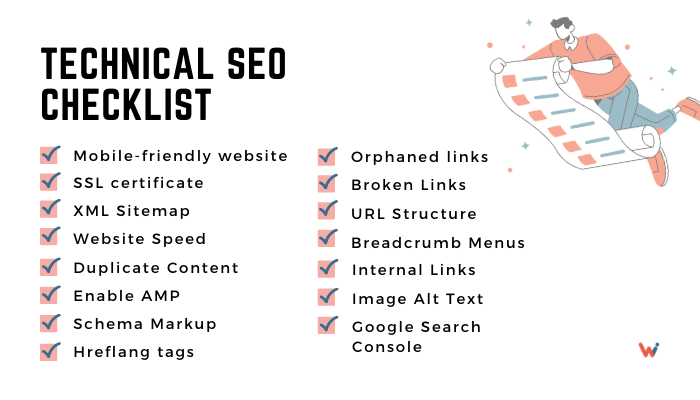
A well-organized website is like a tidy library shelf—visitors can instantly spot what they need and stick around longer. Beyond making people feel at home, a clear site layout helps search engines like Google find and rank your pages. Whether you run a blog, manage an online store, or own a small business, fixing your site structure can seriously up your game in both search results and user satisfaction.
Clean Website Layout Boosts Your SEO
Why Site Layout Matters
Your site layout affects two big areas: how easily people navigate your pages and how search engines crawl them. When you nail both, you create a win–win for visitors and Google alike.
- For Visitors: A simple menu and clear links let people find blog posts, products, or contact forms without frustration. They spend more time exploring and are more likely to come back.
- For Search Engines: Google’s bots follow your links like a reader skimming a book. A neat structure guides them smoothly, so they can index all your important pages without missing a thing.
SEO Perks of a Strong Layout
Even small tweaks to your site’s structure can yield big SEO wins. Here’s how:
- Better Crawling Search engines discover new pages faster when they follow an organized set of links. No more “orphans” hiding in your site.
- More Keyword Focus: Splitting content into clear topic groups lets you assign targeted keywords to each page. That clarity helps Google match your pages to relevant searches.
- Lower Bounce Rates. When visitors find what they need quickly, they stick around instead of hitting the back button. Reduced bounce rates signal to Google that your content is valuable.
- Link Value Distribution Internal links pass ranking power from your strongest pages to newer or weaker ones. A thoughtful link map spreads “SEO juice” across your entire site.
User Benefits of Clear Navigation
Happy visitors turn into loyal readers, customers, or subscribers. Solid site structure delivers:
- Fast Finding Simple menus and breadcrumbs guide people through your site like a map, cutting down clicks and frustration.
- Mobile Ease: A responsive layout adapts to phones and tablets, giving mobile users a smooth browsing experience.
- Accessibility for All Screen-reader Screen-reader-friendly layouts and clear headings help users with disabilities navigate your content easily.
- Trust and Credibility A clean, professional site design boosts confidence. Visitors feel they’re in good hands and are more likely to convert.
Core Parts of an Effective Site Structure
Before you dive into changes, let’s break down the four main building blocks of a user- and SEO-friendly layout.
1. Descriptive URLs
- Keep URLs short and readable, such as yourdomain.com/blog/seo-tips.
- Include the main topic keyword to help both people and search engines know what’s on the page.
- Avoid long strings of numbers or unclear parameters (e.g., ?id=1234).
2. Simple Navigation and Internal Links
- List main site areas in your top menu: Home, Blog, Products, About, Contact.
- Use breadcrumbs (e.g., Home > Blog > SEO Tips) so visitors never lose their way.
- Link naturally between related posts or product pages to guide your audience deeper into your site.
3. Site Maps
- XML Sitemap: A file you submit to Google Search Console so bots can see every URL on your site.
- HTML Sitemap: A user-facing page that lists all sections of your site, helping both visitors and smaller search engines find content.
4. Mobile-First Design
- Choose a theme or template that adjusts layouts on different screen sizes.
- Test your pages with tools like Google’s Mobile-Friendly Test to catch menu or button issues.
- Optimize images and code so mobile pages load quickly.
Step-by-Step: How to Improve Your Site Layout
No need to hire a developer—just follow these simple steps to polish your site’s structure.
1. Run a Site Audit
- Use free tools like Google Search Console, Screaming Frog, or SEMrush to find broken links, crawl errors, and pages with no internal links.
- Create a list of issues: 404 pages, orphan URLs, and duplicate content.
- Tackle the easy fixes first, then move to deeper structural changes.
2. Build a Logical Hierarchy
- Think in categories: broad top-level pages (e.g., “Services”), subcategories (“Web Design,” “SEO”), and detail pages (e.g., “SEO Audit”).
- Ensure no page is more than three clicks from your homepage.
- Group related pages together so both users and bots recognize topic clusters.
3. Sprinkle in Your Keywords
- Pick one primary keyword for each major page and use it in the title, URL, and within your content.
- Optimize image file names and alt text with relevant terms.
- Use keyword-rich anchor text for internal links to strengthen context.
4. Keep It Consistent and Accessible
- Choose a uniform font, color palette, and button style across all pages.
- Add descriptive alt text to images so screen readers can narrate them to visually impaired users.
- Write clear headings (H1, H2, H3) that outline the page structure for all readers.
Real-Life Wins: Case Studies
Seeing is believing. Here are three real examples of businesses that transformed their site layouts and saw big gains.
Case Study 1: Clothing E-Store
A fashion boutique reworked its product hierarchy:
- Created clear categories: “Men’s Clothing,” “Women’s Clothing,” “Accessories.”
- Added breadcrumb trails and “You May Also Like” internal links on product pages.
Results:
- 30% jump in organic search visits.
- 40% drop in abandoned carts over three months.
Case Study 2: Tech Blog
A tech site organized posts into “pillar pages” and clusters:
- Pillar pages covered broad topics like “SEO Basics.”
- Cluster articles on subtopics like “Keyword Research,” all linked back to the main page.
Results:
- 25% boost in page views.
- Users spent 40% longer reading related articles.
Case Study 3: Local Service Provider
A small law firm simplified its service pages:
- Consolidated seven separate practice areas into three main sections.
- Streamlined the menu and improved mobile layout.
Results:
- 18% increase in appointment bookings.
- Lower bounce rate, especially on mobile devices.
Make Site Structure Part of Your Routine
A tidy layout isn’t a one-and-done deal. As you add new pages, run these checks regularly:
- Monthly Audits: Scan for broken links, missing titles, or orphan pages.
- Update Sitemaps: Every time you add or remove key pages, refresh your XML and HTML sitemaps.
- Check Mobile: Rerun mobile-friendly tests whenever you tweak your design or add new features.
- Review Analytics: Watch your bounce rate and user flow reports to spot navigation hiccups.
Wrapping Up: Your Next Steps
A clear site layout is the backbone of better SEO and happier visitors. By cleaning up your URLs, menus, links, and mobile design, you’ll help people find what they need—and help Google rank your pages higher. Start with a quick audit, organize your content into logical groups, and sprinkle in your keywords. Then keep an eye on your results and make tweaks as you grow.
Ready to get started? Pick one tip from this guide and apply it today. You’ll see your site become easier to use, more search-friendly, and more likely to turn visitors into fans or customers.
