

Optimize SEO for Duplicate Content
Optimize SEO for Duplicate Content
Optimize SEO for Duplicate Content
Optimize SEO for Duplicate Content by identifying repeated pages and updating them with unique, helpful information. Quick SEO content repair helps fix issues that may hurt your rankings, making your site more trustworthy and search-friendly.
Duplicate content can quietly chip away at your site’s search rankings and confuse visitors.
When the same text shows up on multiple pages or URLs, search engines struggle to know which one to rank.
That split focus can lead to weaker placement in search results, fewer visitors, and a messy user experience.
In this guide, you’ll learn what duplicate content is, why it matters, how to spot it, and easy fixes you can use right away.
By the end, you’ll have a clear plan to tackle copy issues and keep your site running at its best.
What Is Duplicate Content?
Duplicate content happens when the same block of text appears on two or more URLs.
It might live on your site or pop up across different sites on the web.
Common cases include product descriptions repeated on category pages or printer-friendly versions that mirror the main page.
Tools or tracking links can also create extra URLs that show the same content in slightly different ways.
When search engines see these copies, they have trouble choosing which page is the “real” one.
Why Duplicate Content Hurts Your Site
When search engines find several versions of the same content, they face three key issues:
- They cannot decide which page to show in search results, so that they may rank none of them well.
- Backlinks get split across copies instead of adding strength to a single page.
- Users may bounce when they land on a page that looks identical to what they’ve already seen.
All of this means you miss out on potential traffic, clicks, and conversions.
A clear strategy to handle duplicates makes your best pages stand out and keeps visitors happy.
How to Spot Duplicate Content
Before fixing duplicate content, you need to find it. Here are simple ways to detect copies on your site:
- Run a Site Audit with tools like Screaming Frog, SEMrush, or Ahrefs. These crawlers flag pages with identical titles, headings, or text.
- Check Google Search Console for coverage issues. Look for pages that aren’t indexed or show duplicate metadata warnings.
- Search Snippets Manually. Copy a unique sentence from your site, wrap it in quotes, and paste it into Google. See which URLs show up.
- Watch Your URLs. Parameter tags (for example, “?sort=price”) or variations in www, HTTP vs. HTTPS can create extra copies.
Do these checks every few months to catch new duplicates before they affect your rankings.
Simple Fixes for Duplicate Content
Once you know where the copies live, you have several straightforward ways to fix them:
1. Use Canonical Tags
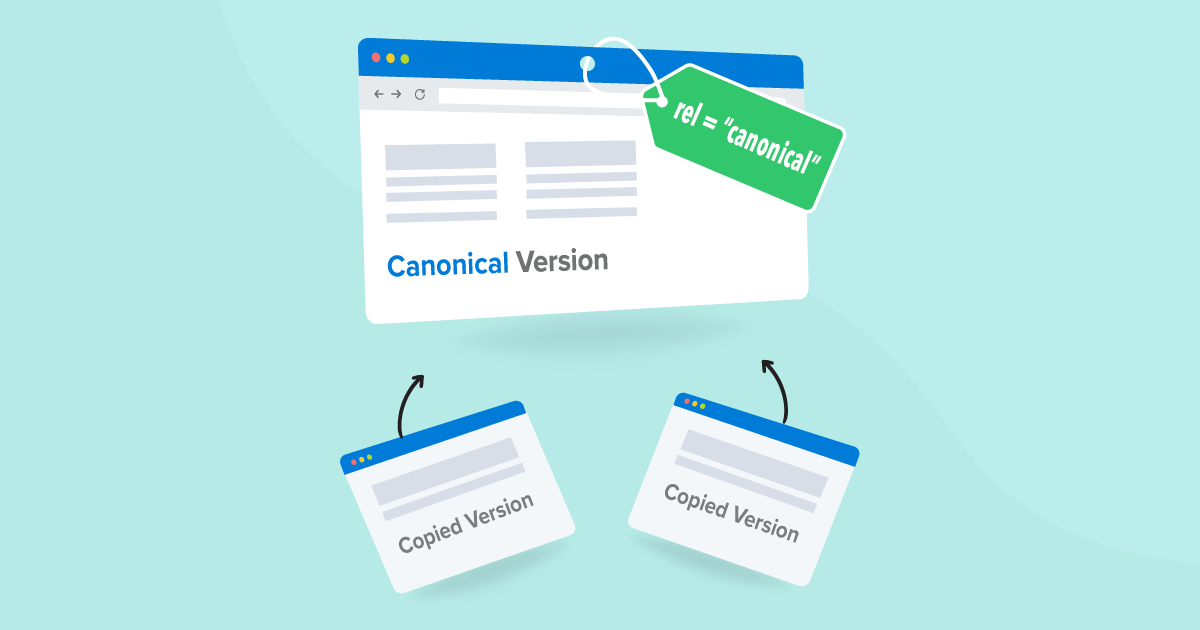
A canonical tag sits in the head section of a page and tells search engines which URL is the primary one.
Example:
<link rel=”canonical” href=”https://www.yoursite.com/preferred-page” />
Put this tag on every duplicate page to point back to the main version. Search engines will then funnel all ranking power to your preferred URL.
2. Set Up 301 Redirects
If a duplicate page offers no unique value, redirect it to the main page.
A 301 redirect passes almost all of the original page’s SEO strength to the new URL and avoids confusing users.
3. Apply Noindex Tags
For pages you need online but don’t want in search results—like printer-friendly formats or staging sites—add:
<meta name=”robots” content=”noindex”>
Optimize SEO for Duplicate Content
Optimize SEO for Duplicate Content
Optimize SEO for Duplicate Content
Optimize SEO for Duplicate Content by identifying repeated pages and updating them with unique, helpful information. Quick SEO content repair helps fix issues that may hurt your rankings, making your site more trustworthy and search-friendly.
This tells search engines not to include the page in their index.
4. Tame URL Parameters
In Google Search Console, point out how you want parameters handled.
For example, tell Google whether “?ref=campaign” creates a new page or just a tracking label.
That keeps each parameter set from spawning its copy of your content.
Advanced Tips and Best Practices
If your site has complex content or lots of product pages, these extra steps can help.
- Combine Strategies: For older duplicates, use a redirect. For live variations, you need, use canonical tags.
- Create Unique Copy: Whenever possible, write new text for each page. Even small tweaks in descriptions can prevent duplication.
- Stay Consistent: Make sure your internal links all point to the same URL format—pick HTTPS and either www or non-www.
- Monitor Regularly: Automate monthly scans to catch new duplicates before they slip under the radar.
Common Mistakes to Avoid
When handling duplicate content, watch out for these pitfalls:
- Multiple Canonicals on One Page: Placing more than one rel=“canonical” tag confuses search engines. Stick to a single, clear canonical reference.
- Pointing the Canonical Tag to an Irrelevant Page. Make sure the canonical URL closely matches the duplicate page, not some unrelated page on your site.
- Ignoring Mixed Protocols. If you have both HTTP and HTTPS versions live, search engines see them as separate. Pick one and redirect the other.
- Forgetting Parameter-Only Pages. Even a session ID or a simple filter parameter can create a page copy. Use parameter settings to stop this.
Double-checking these details saves you from toppling your SEO efforts.
Wrapping Up and Next Steps
Handling duplicate content is one of the simplest ways to boost your site’s SEO and make your pages more visible.
By spotting copies early, using canonical tags, redirects, and noindex rules, you keep your site organized and your rankings strong.
Combine these tactics with regular audits and unique content creation to stay ahead of the game.
If you feel stuck or your site has hundreds of pages, consider reaching out to our SEO experts for a custom audit.
And don’t miss our other guides on improving load times, mobile optimization, and link building to make your site even stronger.
Optimize SEO for Duplicate Content
Optimize SEO for Duplicate Content
Optimize SEO for Duplicate Content
Optimize SEO for Duplicate Content by identifying repeated pages and updating them with unique, helpful information. Quick SEO content repair helps fix issues that may hurt your rankings, making your site more trustworthy and search-friendly.
